LinkedIn Agent Skill: the full setup guide
11 free Claude skills that write your LinkedIn posts, comments, replies and weekly plan. How to add them to Claude in about 3 minutes, and an honest look at what they can and can't do.
- Claude skills
- 11
- Hook formulas
- 21
- To install
- ~3 min
- MIT, no API key
- Free
Set it up in about 3 minutes
A few clicks on the web or the desktop app. No code.
Needs a paid plan (Pro, Max, Team or Enterprise). This is the one I tested.
- 1
Customize → Plugins → Add marketplace
Open Customize in the left sidebar. Go to the Plugins tab, click Add, then Add marketplace.
- 2
Paste the repo, click Sync
Choose “Add from a repository”, paste this into the URL box and click Sync. The red box shows for every plugin that isn't Anthropic's.
avi691/linkedin-agent-skill - 3
Open “Linkedin agent”, click Add
It shows up in the list. Open it to see all 11 skills, then click Add.
- 4
Check it's installed
Under Customize → Plugins → Yours you'll see Linkedin agent. That's the whole install.
- 5
Type /li in a new chat
All 11 skills show up. Pick one, or just ask normally (“write a LinkedIn post about…”) and Claude picks the right skill.
- 6
Give it your voice, once
The first /li-post gives you three hooks, then asks for three of your own posts so it can write like you. Paste three that sound most like you.
/li-post I want to write about
Each chat in the Claude app starts fresh. Ask Claude for the voice.md file it writes and keep it in a Claude Project for LinkedIn, so every chat there knows your voice.
Two commands. Your voice file stays on your computer.
For people who already use Claude Code.
- 1
Add the marketplace
Run this inside Claude Code.
/plugin marketplace add avi691/linkedin-agent-skill - 2
Install the plugin
All 11 skills are now available in every project.
/plugin install linkedin-agent@linkedin-agent-skill - 3
Write your voice file
Paste three of your own posts and ask Claude to write ~/.claude/linkedin/voice.md from them. Every skill reads that file.
Write my ~/.claude/linkedin/voice.md from these three posts
Prefer copying files yourself? The repo README has the git clone version.
Plugins need a paid plan. Single skills work on Free too.
I haven't tested this route myself. Start with the two skills that matter most.
- 1
Turn on code execution
Settings → Capabilities → turn on “Code execution and file creation”. The humanizer needs it to run its scripts.
- 2
Get the skill folders
On the GitHub repo click Code → Download ZIP and unzip it. Zip the li-human folder on its own, then the li-post folder on its own.
- 3
Upload each skill
Customize → Skills → Add → Upload skill. Upload li-human.zip, then li-post.zip.
Write
One idea in, a finished post out. In your voice.
Idea → post
- Give it one idea. You get three hooks from 21 formulas and the one it would pick. /li-post
- Pick a hook. It writes the full post and runs it through the humanizer. /li-post
- You copy it and post it yourself. Links go in the first comment, not the post.
One video → a week of posts
- Paste a transcript, newsletter or article. It pulls out the claims, numbers and stories and plans a week of posts. /li-repurpose
- Got a list or a step-by-step idea? It writes the carousel slide by slide and builds the PDF to upload. /li-carousel
Steal this: Give it one real number from your work. Without one, it should leave {{your number}} in the draft. Always check every number before you post.
Engage
Comments, replies and DMs, written for you. You send them.
10 minutes a day
- Paste someone's post. You get two comment options of different types. Never “Great post!”. /li-comment
- Paste the comments under your post. It sorts them into lead, substance, peer, support and noise, and writes replies in that order. /li-reply
- Reaching out to someone? It writes the 200-character invite note, the first message and two follow-ups. /li-dm
- Paste your messages. It sorts leads, recruiters, peers and spam, and drafts the replies worth sending. /li-inbox
Steal this: It never reads LinkedIn for you. You paste the post, the comments or the messages in. Screenshots work too.
Grow
Plan the week, fix your profile, learn from what you posted.
Every week
- Tell it what you sell, your themes and what happened this week. You get four posts, when to post them, and 10 people from your list to engage with. /li-plan
- Paste your headline, about and experience, or a screenshot. It scores your profile out of 100 on a 12-part rubric and rewrites the weakest parts first. /li-profile
- Paste your analytics export or your last posts with their numbers. It ranks them by engagement rate, not impressions, and tells you what to stop doing. /li-audit
Polish
Makes AI drafts read like a person wrote them.
Before anything goes out
- It swaps 113 stock AI words and phrases (delve, leverage, robust…) and fixes em dashes, curly quotes and hidden characters. /li-human
- It scores what's left on five checks and flags the lines you still need to rewrite yourself. /li-human
Steal this: A PASS is the script's own score. It doesn't run GPTZero or any other real AI detector.
What it can and can't do
It can
- Write posts, comments, replies, DMs and carousels in your voice
- Plan your week, with what to post, when, and who to engage with
- Score your profile out of 100 and rewrite the weak parts
- Clean stock AI words and em dashes out of any draft
- Work in the Claude app (paid plans) and in Claude Code
It can’t
- Post, comment or send anything on LinkedIn. You paste every one.
- Read your feed, comments or inbox. You paste them in.
- Run on autopilot. Nothing is connected to your account.
- Remove Claude's watermark (see the fact check below)
- Promise you'll pass AI detectors like GPTZero
What you might have heard vs what's true
“Connect Claude to LinkedIn and it runs your account on autopilot.”
Nothing connects to LinkedIn. Claude's own plugin page says it "only adds instructions for Claude". Every skill ends with a copy-ready block and you post it yourself. That's on purpose, because automating LinkedIn breaks its User Agreement.
“11 skills, completely free.”
Open source under the MIT licence. No signup, no API key. You still need Claude itself, and plugins need a paid plan.
“It removes Claude's AI watermark.”
Anthropic says its text watermark adds no hidden characters. It sits in the words Claude picks, and light editing probably won't remove it. The humanizer only deletes hidden characters if a draft has them. The repo itself says it makes no claim about watermarks.
“It checks your post against five AI detectors.”
It runs five checks on your text (rhythm, specifics, stock words, typography, voice). They're the script's own rules. It doesn't send your text to GPTZero, Originality or any other detector.
“Nothing gets posted until you say yes.”
True, and it goes further. It can't post at all. Saying yes only logs the post so /li-audit can learn from it later.
“Paste the GitHub link into Claude and say "install".”
That works in Claude Code, where Claude can copy the skills onto your computer. In the Claude app, use Add marketplace (Option 1 above).
Start here
- Add the plugin. Pick your option above. About 3 minutes.
- Run /li-post with one idea. Paste three of your own posts when it asks. Keep the voice.md it writes.
- Run /li-plan once a week.
- Spend 10 minutes a day on /li-comment and /li-reply.
- Run anything important through /li-human, then read every number before you post.
The humanizer, tested
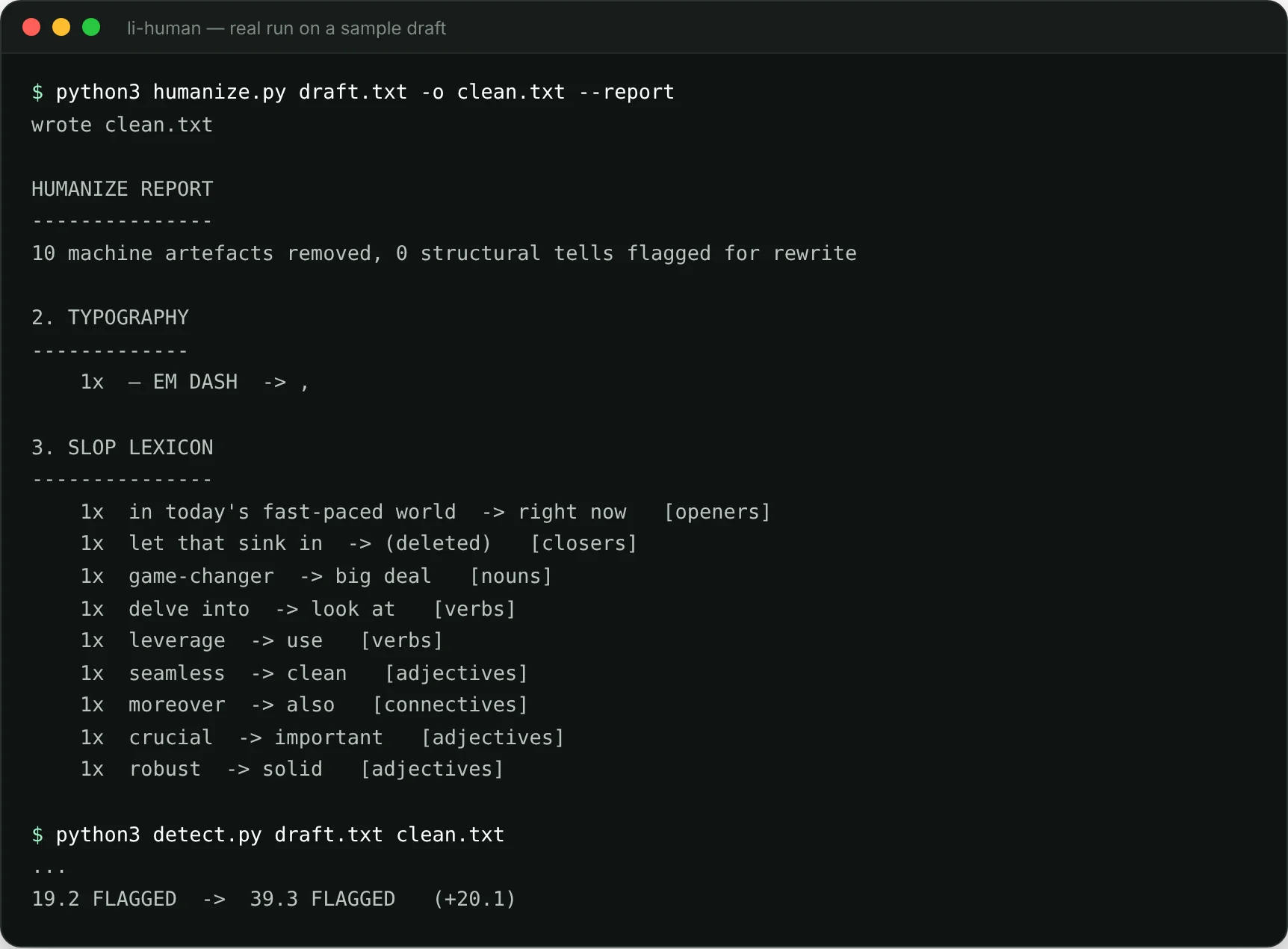
I gave /li-human a deliberately bad draft: “In today’s fast-paced world, AI isn’t just a tool — it’s a game-changer…”. It ran its scripts right inside the Claude chat.
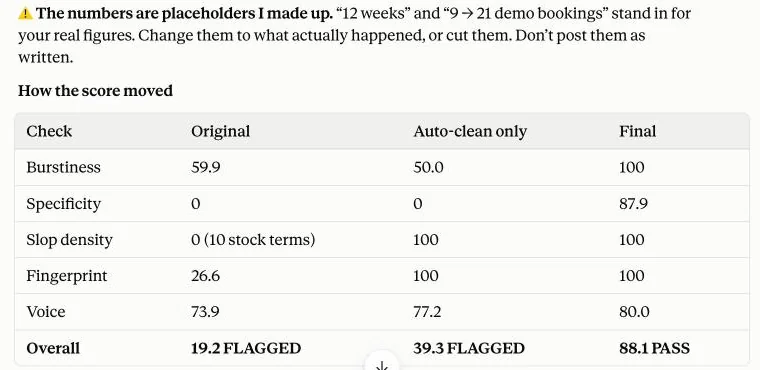
What I learned:
- The auto-clean alone isn’t enough. Swapping the words took the score from 19.2 to 39.3. Still FLAGGED.
- Getting to PASS needed a rewrite. Claude rewrote the post and added numbers to make it specific. It warned me they were made up. Use your own real numbers here, never the placeholders.
- It misses some patterns. It didn’t flag “isn’t just a tool, it’s a…” or “The result? Growth.” Claude caught both on its own.
Same draft, run on a computer with the two scripts from the repo:
Good to know
- It doesn’t post anything. Tools that auto-post or auto-comment break LinkedIn’s rules and get accounts restricted.
- Anthropic doesn’t check outside plugins. This one is plain instructions plus two small Python scripts. Neither one connects to the internet.
- Made by Jake Schincariol, shared by Avi Grondin. All credit to them. The repo has every skill, the 21 hook formulas and the full details.
These skills write. You post.